
Download NOQ APK – Food Ordering App, Event Food Delivery, Mobile Food Ordering
Overview
NOQ is a mobile application designed to streamline food and drink ordering at live events such as music festivals, concerts, and other large gatherings. Developed by NOQ Events, the app aims to eliminate long queues and waiting times by allowing users to browse vendor menus, place orders, and pay securely from their smartphones. The primary purpose of NOQ is to enhance the overall event experience by enabling attendees to spend more time enjoying the event and less time waiting in line. The app is particularly beneficial for individuals attending crowded or fast-paced events where traditional food service can be slow and inefficient.
Target users include event-goers, festival attendees, concert visitors, and anyone looking for a faster, more convenient way to access food and beverages during live events. The app supports both self-collection and delivery options, depending on the event setup, allowing users to choose the most suitable method for their needs. Real-world usage scenarios include ordering a quick snack during a concert break, grabbing a meal between performances at a festival, or receiving a drink delivered to a seated area at a large outdoor event.
The app is available for free download on Google Play, making it accessible to a wide audience. It was released on May 14, 2024, and is compatible with Android 8.0 and above. The application size is 10.2 MB, indicating a lightweight design that should not significantly impact device storage. The developer, NOQ Events, focuses specifically on event-based food service solutions, positioning NOQ as a niche tool within the broader lifestyle category.
Key Features & Capabilities
- Event-Based Menu Browsing – Users can access real-time menus from participating vendors at specific events, allowing them to view available food and drink options before placing an order.
- Mobile Ordering & Payment – The app enables users to place orders and make secure payments directly from their smartphones, eliminating the need for cash or physical cards.
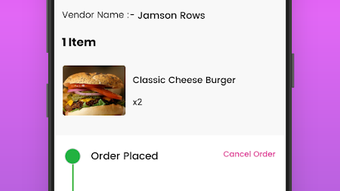
- Order Status Notifications – Users receive timely notifications when their order is ready for pickup, helping them plan their movements efficiently.
- Self-Collection & Delivery Options – Attendees can choose to collect their orders from designated pickup points or opt for delivery to their current location, depending on event logistics.
- Real-Time Order Tracking – While not explicitly detailed, the app likely provides visibility into the order preparation process, ensuring users are informed at each stage.
These features are especially useful in high-traffic environments where traditional queues can cause delays. For example, a festival attendee can order a burger and drink during a performance, receive a notification when it’s ready, and collect it without interrupting their experience. Similarly, someone seated in a designated area can have their food delivered directly to them, enhancing comfort and convenience. The integration of digital payment and real-time updates supports a seamless, modern user experience that aligns with current mobile-first expectations.
User Interface, Workflow & Performance
The user interface of NOQ appears to be designed with simplicity and speed in mind, catering to users who need to place orders quickly during dynamic event environments. Navigation is likely structured around event selection, vendor browsing, order placement, and status tracking. The workflow is expected to be linear: select event → browse vendor menus → add items to cart → review and pay → receive confirmation and notifications.
Given the app’s purpose, ease of use is critical. The interface should minimize steps and reduce cognitive load, allowing users to complete orders in under a minute. The design likely emphasizes clear visual cues, intuitive icons, and responsive feedback to support fast decision-making. Performance is expected to be stable under moderate load, though exact details on CPU or RAM usage were not specified.
Since the app is lightweight at 10.2 MB and built for Android 8.0 and above, it should run smoothly on a wide range of devices. The developer did not provide additional system requirements, so performance may vary based on device hardware and network conditions. However, the app’s focus on event-specific functionality suggests it is optimized for short, high-frequency usage rather than extended background operation. Stability during peak event hours is likely prioritized, though real-world performance data was not disclosed.
Compatibility & System Requirements
NOQ is compatible with Android 8.0 and above, ensuring broad accessibility across a wide range of smartphones and tablets. The app is available exclusively through Google Play, which means it adheres to Android’s security and distribution standards. The installation size is 10.2 MB, indicating a minimal footprint that should not consume significant storage space on most devices.
Exact system requirements were not listed, so users should ensure their device meets the minimum Android version. Hardware specifications such as RAM, processor speed, or GPU capabilities were not provided by the developer. As a result, performance on lower-end devices may vary, though the lightweight nature of the app suggests it is designed to function efficiently even on entry-level Android hardware. Compatibility with older Android versions beyond 8.0 is not confirmed.
Pros and Cons
Pros
- Eliminates long food queues at events
- Supports both pickup and delivery options
- Free to download and use
- Lightweight app size (10.2 MB)
- Real-time order status notifications
- Secure mobile payment integration
Cons
- Available only on Android (no iOS version confirmed)
- Limited to events with participating vendors
- Requires stable internet connection for ordering
- No information on offline functionality
- Performance details not publicly disclosed
FAQ Section
Is NOQ available for iOS devices?
The current information indicates that NOQ is available for Android only. There is no confirmation of an iOS version at this time.
Can I use NOQ without an internet connection?
Since the app relies on real-time menu access, order submission, and notifications, it requires an active internet connection. Offline functionality was not specified by the developer.
Is the app secure for making payments?
NOQ integrates mobile payment options, suggesting it uses standard security protocols for transaction processing. However, specific details about encryption or data handling were not provided.
How often are app updates released?
The developer has not disclosed a regular update schedule. Updates are likely released in response to event-specific needs or security improvements.
Do I need to create an account to use NOQ?
While not explicitly stated, the app likely requires a basic user profile to place orders and receive notifications. Full registration details were not included in the provided information.
Final Thoughts + CTA
NOQ presents a practical and timely solution for attendees seeking a faster, more enjoyable food and drink experience at live events. By enabling mobile ordering and real-time updates, the app effectively reduces wait times and enhances convenience. Its lightweight design and free access make it accessible to a broad audience, particularly those attending music festivals, concerts, and similar gatherings.
While the app is currently limited to Android and event-specific availability, its core functionality is well-aligned with modern user expectations. The inclusion of both pickup and delivery options adds flexibility, and the secure payment system supports a smooth transaction process. For event-goers who value efficiency and comfort, NOQ is a valuable tool.
Download NOQ APK now to transform your event experience—order food and drinks without the wait and focus on what truly matters: enjoying the moment.







